Buying Guides
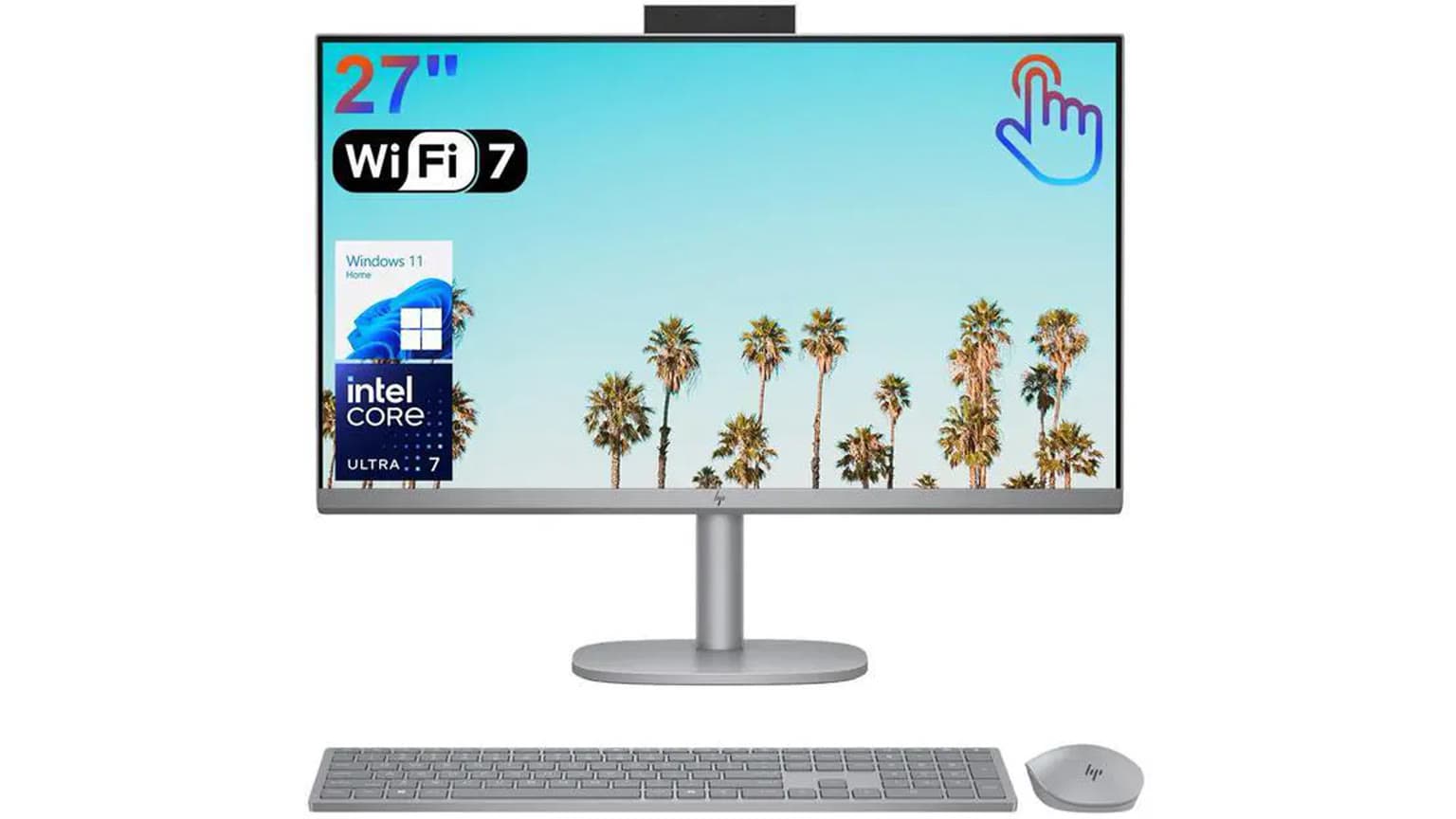
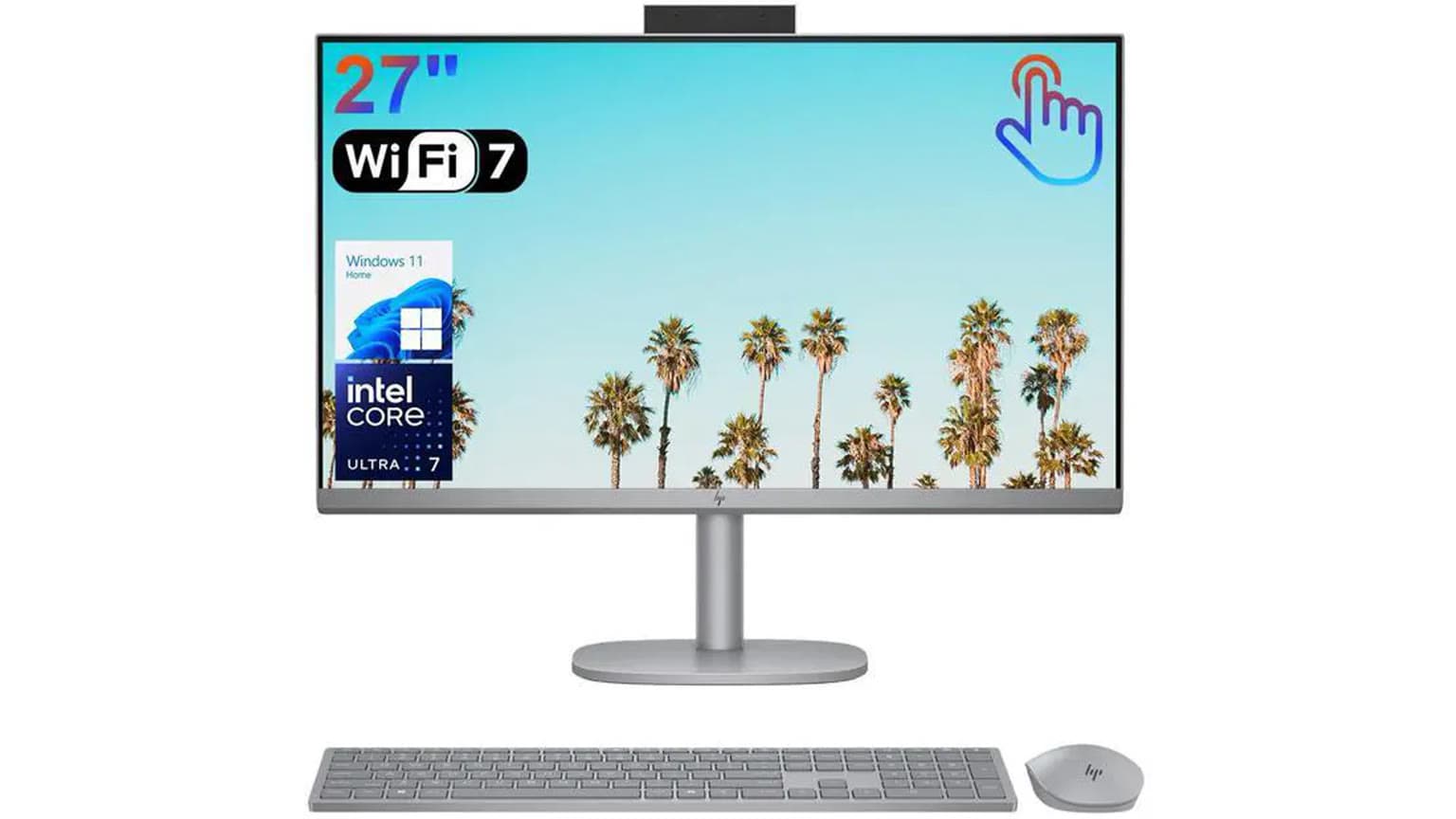
The HP All-in-One 27-cr1025nh is listed on Ogabassey at ₦1,587,300 and marked available as of 2026-09-04. It is best for Nigerian offices, schools, reception desks and home workstations that want Core Ultra 7 productivity, 16GB RAM, 1TB storage and a tidy 27-inch touch desktop setup.
The HP All-in-One 27-cr1025nh is not the buyer’s choice if the first priority is gaming graphics, field mobility, or a workstation tower that can be expanded heavily over time. Its strongest fit is the buyer who wants a clean fixed desk computer: fewer cables, no separate monitor purchase, a large display already included, and enough memory and storage for serious daily work.
For a Nigerian office, that means front-desk systems, accounting desks, POS administration, HR workstations, call-centre supervisor desks, school admin offices, and executive home-office setups. The 27-inch screen is the practical selling point. It gives more room for spreadsheets, browser tabs, document review, dashboards, video calls, and split-screen work than a 14-inch or 15-inch laptop. The touchscreen adds convenience for kiosk-like use, quick form input, training rooms, and shared family spaces, though it should not be treated as a replacement for a proper drawing tablet.
This is also a sensible choice when the buyer does not want to assemble a monitor, mini PC, webcam, speakers, keyboard, and mouse separately. The Ogabassey catalog snapshot lists the condition as new and includes HP 125 USB white wired keyboard and mouse as the selected package detail. That bundle style is useful for procurement because the desk can be deployed quickly after software setup.

The catalog-verified configuration is built around an Intel Core Ultra 7 155U Series 1 processor, listed at a 1.70GHz base and up to 4.80GHz. Intel’s official Core Ultra 7 155U specifications identify it as a 12-core, 14-thread U-series processor with Intel Graphics and Intel AI Boost. In buyer terms, this is a modern efficiency-focused processor for productivity, browser-heavy work, Microsoft Office, light creative tasks, video conferencing, and business multitasking, not a dedicated gaming or 3D rendering platform.
The Ogabassey product row lists 16GB RAM and 1024GB internal storage. That is an important baseline. For Windows office use in 2026, 8GB RAM is increasingly tight once Chrome, Teams, WhatsApp Desktop, accounting software, antivirus, cloud sync, and multiple spreadsheets are open. 16GB is the more realistic floor for a ₦1.5m-plus all-in-one. The 1TB SSD is also valuable because many offices keep local files, offline accounting backups, scanned documents, media assets, and shared user folders on the machine instead of relying fully on cloud storage.
The display is listed as 27.0 inches with FHD IPS touchscreen resolution. The strength is size and viewing comfort; the trade-off is pixel density. A 27-inch FHD panel gives big text and a roomy work surface, but it is not as sharp as QHD or 4K at the same size. For accounting, admin work, browsing, lessons, meetings, and general business use, FHD is acceptable. For designers, video editors, CAD users, or anyone who spends the day checking fine type and image detail, a sharper external monitor or a different desktop setup may be better.
| Entity | Attribute | Catalog value and buyer meaning |
|---|---|---|
| HP All-in-One 27-cr1025nh | Ogabassey price | ₦1,587,300, checked from the supplied Ogabassey snapshot dated 2026-09-04. Use the live product card for the current offer before payment. |
| HP All-in-One 27-cr1025nh | Availability | Marked InStock. Inventory policy is unmanaged catalog stock, so the numeric stock count should not be read as the final availability cap. |
| HP All-in-One 27-cr1025nh | Condition | New. |
| HP All-in-One 27-cr1025nh | Category | Desktops. |
| Display | Size and panel | 27.0 inches, FHD IPS touchscreen. Good for large-desk productivity; not the sharpest choice for pixel-sensitive creative work. |
| Performance | Processor | Intel Core Ultra 7 155U Series 1, base 1.70GHz up to 4.80GHz. Best read as a strong productivity chip rather than a gaming GPU substitute. |
| Memory | RAM | 16GB. Practical for office multitasking, browser-heavy work, calls, spreadsheets, and school administration. |
| Storage | Internal drive | 1024GB PCIe NVMe SSD. Strong capacity for local files and office archives. |
| Connectivity | 5G support | No. Use wired broadband, Wi-Fi, or a separate router/modem where needed. |
| Sound | 3.5mm jack and speaker note | Catalog lists no 3.5mm jack and mono loudspeaker. Confirm exact audio ports and speaker behaviour before checkout if conferencing audio matters. |
| Expansion | Card slot | No card slot listed. Plan for USB storage, cloud transfer, or an external card reader. |
| Warranty and trust | Pre-payment checks | Confirm exact model or part number, operating system, keyboard layout, plug type, warranty or return eligibility, package contents, and delivery timing before checkout. |
| Alternatives | When to compare | Compare with tower desktops if you need heavier upgrade paths, or laptops if battery-backed mobility matters. |
The key judgement is that this HP is a convenience-first performance buy. The Core Ultra 7 155U gives the machine a stronger CPU class than basic Celeron, Pentium, Core i3, or older entry desktop systems. It should feel much better for multitasking and modern Windows work, especially paired with 16GB RAM and an SSD. It is the kind of specification that reduces office friction: fewer pauses while opening large spreadsheets, smoother browser sessions, better responsiveness during video meetings, and enough headroom for ordinary admin software.
What it is not is a gaming desktop. The Ogabassey snapshot does not list a dedicated NVIDIA or AMD GPU, and the processor family relies on integrated Intel Graphics. That is fine for display output, media playback, office apps, and light graphics work, but buyers looking at Gaming Laptops because they need CUDA workloads, high-refresh gaming, or heavy 3D performance should not treat this all-in-one as an equivalent replacement.
Thermals also deserve a practical note. All-in-one desktops pack the PC behind or inside the display housing, so airflow is usually less flexible than a tower. That does not make the HP a poor choice, but it changes expectations. Keep the rear vents clear, avoid pushing it against a wall in a hot room, and consider stable power protection. In many Nigerian offices, dust, heat, voltage swings, and generator or inverter transitions matter as much as the spec sheet. A UPS or surge protector is a sensible accessory for a machine at this price.
The 27-inch FHD IPS touchscreen is the clearest reason to buy this model instead of a compact mini PC or ordinary laptop. Large FHD works well for people who prefer readable text at normal scaling. It is especially helpful where two people may view the screen together, such as reception work, lesson review, finance approvals, or family use. The IPS panel description matters because it generally points to better viewing angles than basic TN-style displays, which helps on shared desks.
The port story needs caution. The Ogabassey catalog snapshot does not provide a full port list beyond the absence of a card slot, NFC, radio, 5G support, and 3.5mm jack. HP’s official family documentation for nearby 27-inch all-in-one lines shows that ports can vary by model and configuration, so the safe buyer move is to confirm the exact rear and side I/O on the unit being supplied. Ask specifically about HDMI output or input, USB-C, USB-A count, Ethernet, webcam, microphone, and audio jack availability before payment.
That matters because an all-in-one is less forgiving than a tower after purchase. If your office needs barcode scanners, receipt printers, external drives, LAN cable, external speakers, headset adapters, or a second display, confirm the connections first. If the 3.5mm jack is genuinely absent on the supplied configuration, plan for USB headsets, Bluetooth audio, or USB audio adapters for calls. If SD-card import matters for a school media desk or content team, budget for an external card reader.

At ₦1,587,300, the HP All-in-One 27-cr1025nh sits in a serious procurement bracket. The value is not only the processor. It is the combined cost of a new HP-branded desktop, 27-inch touch display, 16GB RAM, 1TB SSD, keyboard, mouse, and a cleaner deployment footprint. For some offices, that combined package is easier to approve and maintain than buying separate parts from different sources.
The live commerce point is important: the price above is a publication-time editorial snapshot from the supplied Ogabassey product data as of 2026-09-04. The product rail should show the current catalog price and availability at render time, so buyers should use the linked product card before checkout rather than treating the article price as fixed. Because the inventory policy is unmanaged, the product can be marked available even though the numeric stock quantity is zero. That should be read as catalog availability requiring confirmation, not as a promise that every configuration is physically on a shelf at every moment.
Before paying, confirm warranty terms in writing. Ask whether the warranty is local seller warranty, HP regional warranty, or another documented arrangement. Also confirm return eligibility, dead-on-arrival handling, delivery timeline, plug type, keyboard layout, operating system, and whether the exact RAM layout is 1x16GB or another arrangement. The product description mentions 16GB DDR5-5600 MT/s RAM and a 1TB PCIe NVMe SSD, but buyers should still verify the final invoice configuration because all-in-one model names can hide regional variations.
The first trade-off is mobility. A laptop from Ogabassey Laptops is easier for students, field workers, hybrid staff, and anyone who needs battery power during outages. The HP 27-cr1025nh is better when the desk is the destination and a larger screen is worth more than movement.
The second trade-off is upgradeability. The catalog lists 16GB RAM and 1TB storage, which is already comfortable for the intended office buyer. Still, a tower desktop is usually easier to repair, cool, expand, and repurpose over years. If your use case may later require a dedicated graphics card, multiple internal drives, capture cards, or unusual PCIe add-ons, compare against a tower such as the kind discussed in Ogabassey’s HP Elite Tower 600 G9 office desktop guide.
The third trade-off is display resolution. A 27-inch touchscreen is convenient, but FHD across 27 inches is not premium sharpness. Buyers moving from a small laptop may love the size. Buyers coming from a QHD or 4K monitor may notice the lower pixel density. If visual detail is central to the job, compare monitor quality before choosing an all-in-one.
If you like the all-in-one idea but want to spend less, compare this model with Ogabassey’s HP 27 All-in-One 27-cr1024nh guide. That adjacent model can help clarify whether the higher Core Ultra 7 configuration and listed ₦1,587,300 price make sense for your workload.
If you are choosing for a mixed office and want a non-HP benchmark, the Dell 27 All-in-One 16GB vs 32GB guide is useful for thinking through memory, desk fit, and procurement value. A 32GB configuration can be more attractive for heavy browser use, analytics dashboards, or users who keep many apps open all day.
If battery-backed mobility is the real problem, do not force an all-in-one into the role. A strong business laptop may be more practical, especially where power cuts are common and the user must continue working away from a fixed desk. If macOS-only apps, iPhone continuity, or long battery life are central, check Macbooks as a separate lane, but weigh software compatibility, repair cost, keyboard preference, and office IT policy before switching platforms.
Buy the HP All-in-One 27-cr1025nh if you want a new, clean, large-screen HP desktop for productivity and can justify ₦1,587,300 for a 27-inch touch AIO with Core Ultra 7 155U, 16GB RAM, and 1TB SSD. It is strongest for office, business, and school-administration desks where space, neatness, and easy deployment matter.
Pause if you need gaming graphics, confirmed high-end audio ports, battery mobility, QHD or 4K sharpness, or a long upgrade path. The right pre-check is simple: confirm live availability, exact model number, RAM layout, OS, ports, warranty, return terms, plug type, and delivery timing on the Ogabassey product card before checkout.
The supplied Ogabassey catalog snapshot lists the HP All-in-One 27-cr1025nh at ₦1,587,300 as of 2026-09-04. Treat that as an editorial snapshot, not a permanent quote. Use the live Ogabassey product card for the current price and availability before payment.
Yes, based on the catalog specs. The Core Ultra 7 155U, 16GB RAM, 1TB SSD, and 27-inch FHD IPS touchscreen fit office productivity, school administration, video calls, spreadsheets, browser work, and front-desk systems. It is not the best choice for heavy gaming or GPU-based creative work.
No. The catalog lists 5G support as No. For internet access, plan around office Wi-Fi, Ethernet if available on the supplied unit, or a separate router or modem. Confirm the exact networking ports and wireless configuration before checkout.
Choose this HP all-in-one if the computer will stay on one desk and the 27-inch touch display matters. Choose a laptop if battery power, mobility, field work, or moving between home and office matters more than screen size.
Catalog-linked prices update automatically. Historical and other quoted prices remain as written. Open the product page to confirm the current price, selected variant and availability before buying.