Accessories
Apple • ₦127,500
Apple • ₦150,000
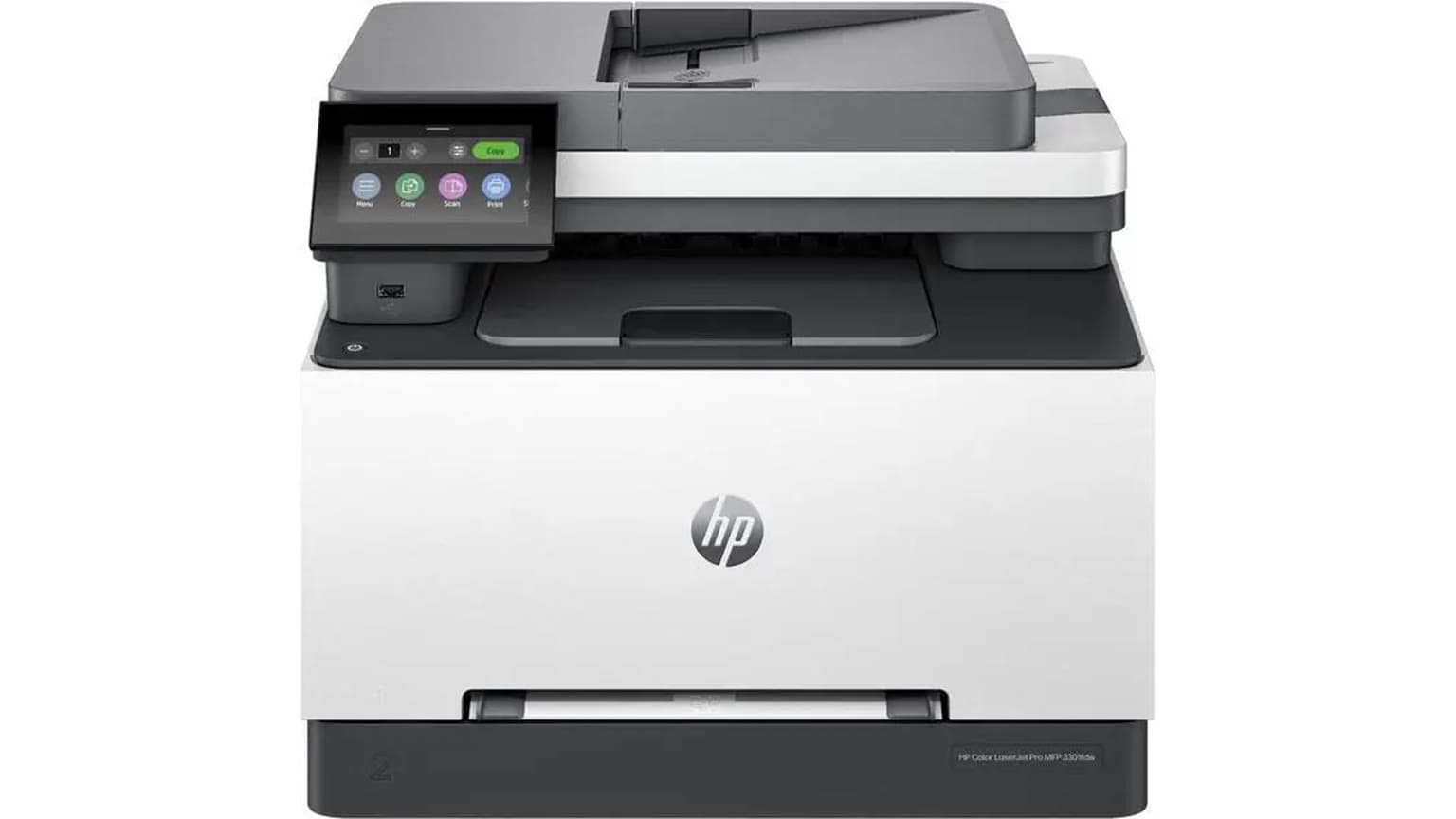
At ₦605,000 on Ogabassey, the HP Color LaserJet Pro MFP 3303fdw is a better fit for Nigerian offices that need reliable colour documents, scanning, copying and fax than for homes chasing the lowest running cost. Ogabassey lists it as available, with unmanaged catalog stock, so confirm live fulfilment, warranty route and toner package before payment.
The HP Color LaserJet Pro MFP 3303fdw is for a small office, school admin desk, clinic, law office, church office or home business that prints colour documents often enough to justify a laser all-in-one. The useful question is not simply whether it can print. It is whether a ₦605,000 colour laser MFP is the right operating choice beside cheaper ink tank printers, basic mono lasers and larger managed office machines.
Choose this HP if your team needs colour proposals, forms, certificates, invoices, letterheads, class notes, reports and scanned documents from one device. HP lists this model as a print, copy, scan and fax machine, with automatic duplex printing, dual-band Wi-Fi, Ethernet, USB, a flatbed scanner and a 50-sheet automatic document feeder. That combination matters in Nigeria because many offices still mix mobile printing, laptop printing, walk-up copying and paper document capture.
This is less ideal if your workload is mostly children’s school assignments, occasional home prints or very high-volume black-and-white paperwork. For light home use, the upfront cost is high. For very heavy monochrome use, a mono laser or a larger managed LaserJet may make more sense. For buyers focused on the lowest cost per colour page, compare it carefully with HP ink tank alternatives before committing.
You can check the current Ogabassey catalog page for the HP Color LaserJet Pro MFP 3303fdw, then compare the wider Printers category if your office does not need colour laser speed, fax or ADF scanning.

Catalog-verified Ogabassey facts first: the listed product is the HP Color LaserJet Pro MFP 3303fdw, condition new, category Printers, model number 499M8A, current Ogabassey price ₦605,000, availability InStock, and inventory policy unmanaged catalog stock. Unmanaged stock means the storefront availability is not capped by the numeric stock count shown in the catalog snapshot; it should not be read as out of stock just because stock quantity is 0.
Official HP context fills in the operating picture. HP’s product pages describe the 3303fdw as a colour laser multifunction printer with print, copy, scan and fax. HP lists up to 25 ppm A4 print speed for both black and colour, automatic two-sided printing, up to 600 x 600 dpi print quality, built-in dual-band Wi-Fi, Wi-Fi Direct, Gigabit Ethernet and USB connectivity. HP’s support specification page also lists a 250-sheet main input tray, 100-sheet output tray, 512 MB memory, flatbed plus ADF scanner, duplex ADF scanning, and a recommended monthly page volume of 150 to 2,500 pages.
For a Nigerian buyer, the most important details are not the headline speed alone. Ask what paper sizes your office uses, how often staff scan multi-page documents, whether your router coverage reaches the printer location, whether you need Ethernet for stability, and how quickly replacement toner can be sourced. A colour laser printer uses four toner cartridges: black, cyan, magenta and yellow. That can produce crisp office colour, but it also means you should price all four toner colours before treating the ₦605,000 printer price as the full ownership cost.
| Entity | Attribute | Value for buyer decision |
|---|---|---|
| HP Color LaserJet Pro MFP 3303fdw | Current Ogabassey price | ₦605,000 |
| HP Color LaserJet Pro MFP 3303fdw | Availability | InStock on Ogabassey catalog snapshot; confirm live availability before checkout |
| HP Color LaserJet Pro MFP 3303fdw | Inventory policy | Unmanaged catalog stock, so numeric stock quantity does not cap availability |
| HP Color LaserJet Pro MFP 3303fdw | Condition | New |
| HP Color LaserJet Pro MFP 3303fdw | Category | Printers |
| HP Color LaserJet Pro MFP 3303fdw | Model number | 499M8A |
| Official HP specification | Functions | Print, copy, scan and fax |
| Official HP specification | Print technology | Laser |
| Official HP specification | Print speed | Up to 25 ppm A4 in black and colour |
| Official HP specification | Wireless support | Built-in dual-band Wi-Fi and Wi-Fi Direct |
| Official HP specification | Wired connectivity | USB and Gigabit Ethernet listed by HP |
| Official HP specification | Scanner support | Flatbed, ADF and duplex ADF scanning listed by HP |
| Buyer check | Toner cost | Not listed in Candidate JSON; confirm black, cyan, magenta and yellow cartridge pricing |
| Buyer check | Warranty and delivery context | Confirm Ogabassey warranty or return route and delivery timing before payment |
| Alternative path | Ink tank comparison | Consider HP Smart Tank models if low colour running cost matters more than laser output |
The cheapest printer to maintain depends on your workload. An ink tank model is often the better route for frequent colour schoolwork, photo-light documents and offices that can tolerate slower output in exchange for refill economics. A mono laser is usually better for large black text runs where colour is not needed. A colour laser all-in-one like the HP Color LaserJet Pro MFP 3303fdw sits between those options: it gives sharper office-style colour documents, faster business output and stronger paper handling, but toner replacement can be more expensive than ink bottles.
That is why the ₦605,000 price should be judged against volume and workflow, not only against cheaper shelf prices. If an office prints weekly proposals, scans signed documents, copies ID forms and needs Ethernet or stable Wi-Fi access for multiple staff, one dependable colour laser MFP can be easier to manage than a cheaper printer that regularly slows down the desk. If the printer will sit idle for long periods, or if colour use is casual, the money may be better spent on an ink tank device or a simpler laser.
For a useful local check, estimate your monthly pages before buying. HP’s support page lists a recommended monthly page volume of 150 to 2,500 pages for this model. If your office is under that lower end most months, the machine may be more capability than you need. If you regularly exceed the upper end, look beyond this SKU to bigger workgroup printers and ask specifically about service support, toner availability and duty-cycle headroom.
OgaBassey already has related HP ink tank context that can help you compare the running-cost question. The HP Smart Tank 750 office guide is a useful alternative angle if refill cost and everyday document volume matter more than colour laser output. The HP Smart Tank 720 wireless guide is also relevant if your priority is Wi-Fi printing with tank economics rather than laser toner.

Connectivity is one of the strongest reasons to consider this model. HP lists dual-band Wi-Fi, Wi-Fi Direct, USB and Gigabit Ethernet. In a Nigerian office where routers are sometimes placed far from the admin desk, Ethernet can be the difference between stable shared printing and constant reconnection complaints. If the printer will serve several staff, plan its location near the router or a network point, not only near the person who prints most.
Scanner support is equally important. The flatbed helps with IDs, stamped forms and fragile pages. The ADF helps with multi-page contracts and applications. HP lists duplex ADF scanning, which is valuable when your team scans two-sided documents. Before checkout, still confirm the exact package contents, regional power variant and setup support, because HP notes that power requirements vary by country or region and the product is not dual voltage. For Nigeria, buyers should avoid assumptions about plug type, voltage variant or included cable until the seller confirms the supplied unit.
Mobile printing should also be tested in your workflow. HP lists Android, iOS, Windows, macOS and Linux compatibility on its support specification page, but driver availability and office IT policy still matter. If your office runs older laptops, locked-down work computers or mixed personal phones, ask how setup will be handled before payment. A printer can have the right wireless hardware and still become frustrating if no one owns the setup process.
The first trade-off is toner. Colour laser convenience comes with four consumables, and HP also discloses dynamic security on its regional product pages. In practical terms, buyers should verify the exact toner cartridge family, original HP cartridge availability, and whether compatible cartridges are acceptable for their risk tolerance. Do not buy a colour laser MFP on printer price alone if your monthly output includes many colour-heavy documents.
The second trade-off is size and office discipline. This is a multifunction office printer, not a tiny personal desk printer. The ADF, output tray and paper path need room. It should be placed where staff can load paper, scan documents and retrieve output without blocking a walkway or sharing one unstable extension socket with other high-draw devices.
The third trade-off is that the Ogabassey product snapshot includes limited catalog specs beyond model number and basic category. The official HP page supplies useful technical context, but buyers should still confirm live variant, package contents, warranty route, return eligibility and delivery timing with Ogabassey before checkout. That is especially important for office purchases where downtime and after-sales clarity matter more than a small price difference.
Shortlist the HP Color LaserJet Pro MFP 3303fdw if your office needs colour laser output, ADF scanning, fax, automatic duplex and multiple connection options in one device. At ₦605,000, it is positioned as a serious office purchase, not a casual home printer. Its value is strongest when several staff share it and when scanning is part of daily work.
Choose an HP Smart Tank alternative if your main worry is long-term colour page cost. Ink tanks can be more attractive for schools, small design admin work, family businesses and home offices that print many colour pages but do not need laser sharpness or fax. Choose a mono laser if your office prints mostly black invoices, receipts, letters and forms. Choose a larger managed LaserJet class if you are buying for a busy department, shared floor or print room with heavier monthly output.
The cleanest buying path is to open the Ogabassey Printers category, compare what is currently listed, then return to the HP Color LaserJet Pro MFP 3303fdw product page only if the colour laser workflow still matches your office.
Buy the HP Color LaserJet Pro MFP 3303fdw from Ogabassey if your Nigerian office needs one new HP colour laser machine for printing, copying, scanning and faxing, and if the ₦605,000 price fits a business workflow rather than occasional home use. The strongest reasons are the official HP-listed colour laser engine, ADF and flatbed scanning, automatic duplex, Wi-Fi, Ethernet and USB. The reasons to pause are toner cost, warranty clarity, power/package confirmation and whether an ink tank would be cheaper for your actual colour volume.
For most small offices, the decision should come down to five checks: monthly page volume, toner availability, network setup, scan workload and after-sales route. If those checks are positive, this is a sensible all-in-one office printer. If two or more are uncertain, compare HP Smart Tank or mono laser options before paying.
For many colour-heavy users, an ink tank is usually the cheaper maintenance route. For mostly black text, a mono laser can be better. The HP Color LaserJet Pro MFP 3303fdw makes more sense when an office needs colour laser output plus scan, copy, fax, Wi-Fi and Ethernet in one shared device.
Yes. The Candidate JSON lists the product as InStock at ₦605,000 with unmanaged catalog stock. Because unmanaged stock is not capped by the numeric stock count, buyers should still confirm live availability, delivery timing and payment details before checkout.
HP lists built-in dual-band Wi-Fi and Wi-Fi Direct for this model, plus USB and Gigabit Ethernet. For a shared Nigerian office, Ethernet is worth considering if router placement or Wi-Fi reliability is a concern.
Confirm the exact model number 499M8A, new condition, package contents, voltage and plug variant, toner cartridge pricing, warranty or return route, and live Ogabassey availability. Those checks matter more than headline print speed for long-term office use.
Catalog-linked prices update automatically. Historical and other quoted prices remain as written. Open the product page to confirm the current price, selected variant and availability before buying.