Buying Guides
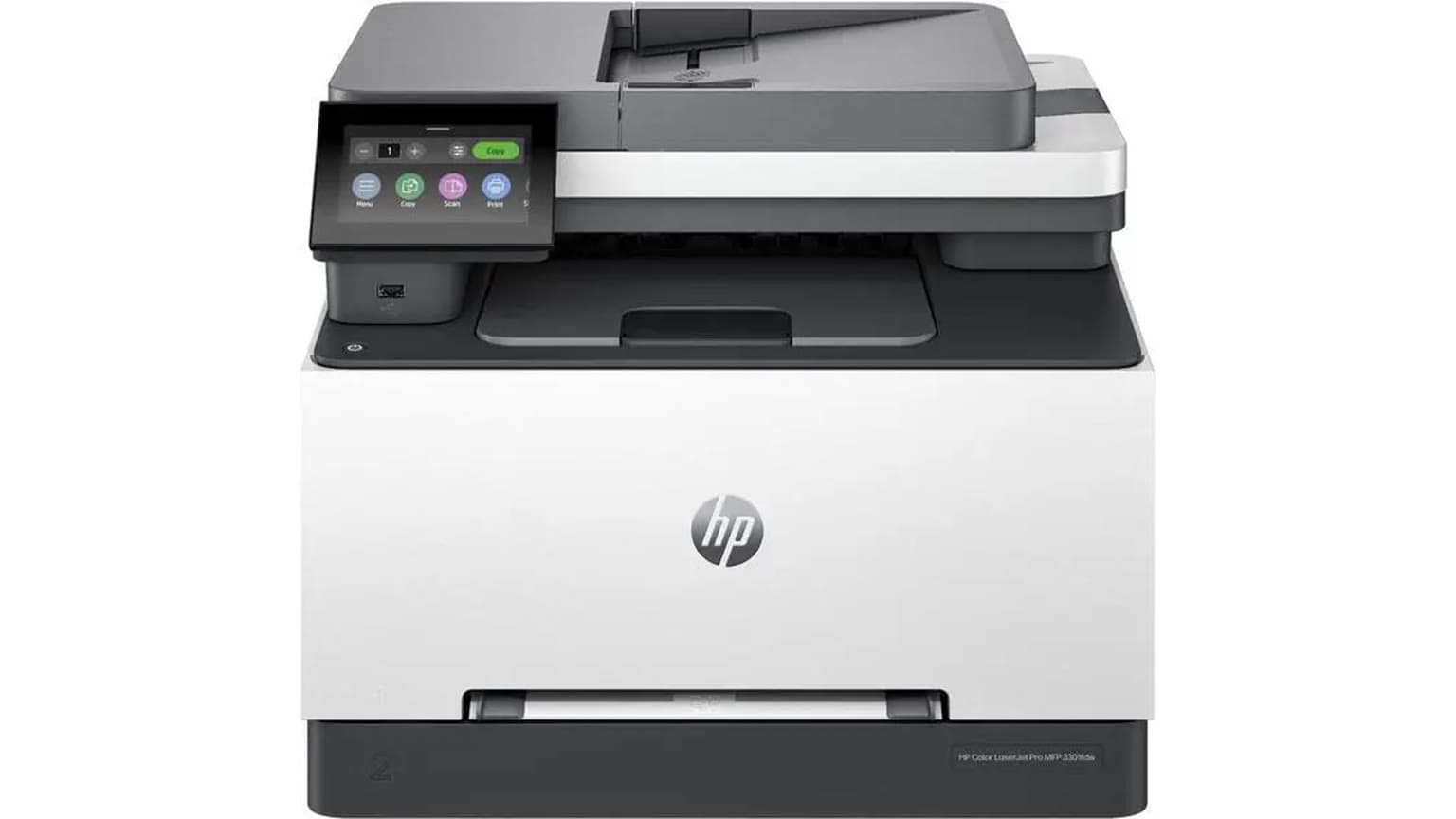
The HP Color LaserJet Pro MFP 3303fdn is available in the Ogabassey catalog at ₦564,000 and is best treated as a shared office colour laser MFP for printing, scanning, copying and fax. Before checkout, confirm live availability, toner supply, power suitability and warranty handling.
The HP Color LaserJet Pro MFP 3303fdn is a practical fit for small offices, schools, admin desks and front-office teams that need colour documents, ADF scanning, copying, fax and network printing from one device. It is not the cheapest route for every colour page, but it is more office-focused than a basic home inkjet because it is built around toner output, automatic two-sided printing and shared connectivity.
For Nigerian buyers, the buying question is not just whether the printer can print in colour. The better question is whether the running cost, toner route, network setup, paper handling, power environment and warranty path match the way the office actually works. A colour laser printer usually makes the most sense when documents need to be sharp, regular and shared by several people. An ink tank alternative can still be better where the office prints many colour-heavy pages and can accept a different maintenance routine.
This guide separates catalog-verified facts from official-source specifications and editorial buyer judgement. Ogabassey provides the product identity, current ₦564,000 price, category, condition and availability state. HP official specification pages provide the printer family details used for functions, connectivity, ADF, duplex printing, monthly volume guidance and warranty language.

HP lists the Color LaserJet Pro MFP 3303fdn, model 499M7A, as a colour laser multifunction printer for print, copy, scan and fax. Official HP specifications list print speeds up to 25 ppm for black and colour on A4, automatic two-sided printing, a 50-sheet automatic document feeder, flatbed scanning, fax support and a recommended monthly page volume of 150 to 2,500 pages. Those figures place it closer to a small-office work machine than a casual home printer.
Connectivity is one of the main reasons to consider this model. HP lists USB, Gigabit Ethernet, dual-band Wi-Fi and Wi-Fi Direct support. That gives an office three realistic deployment paths: direct USB for one workstation, Ethernet for a stable shared office network, or Wi-Fi where cabling is inconvenient. For a Nigerian office with several users, Ethernet is usually the cleanest plan because it reduces password, signal and distance problems. Wi-Fi is still useful, but only if the router is close enough and the office is prepared to keep the printer on a reliable network.
The scanner side is also important. HP lists both ADF and flatbed scanning, with scan-to-email, scan-to-network-folder, scan-to-USB and scan-to-computer support. That makes the printer useful for teams that digitise IDs, receipts, forms, signed letters, waybills or HR documents. The 50-sheet ADF is valuable for loose multi-page documents, while the flatbed remains useful for passports, IDs, fragile papers and single-page originals.
Use this compact Entity-Attribute-Value table as the first buying screen:
| Entity | Attribute | Value | Buyer meaning |
|---|---|---|---|
| HP Color LaserJet Pro MFP 3303fdn | Current Ogabassey price | ₦564,000 | Use this as the catalog price, then confirm live availability before payment. |
| HP Color LaserJet Pro MFP 3303fdn | Availability | In stock in catalog | Unmanaged catalog stock means the listing is available, but delivery timing should still be confirmed. |
| HP Color LaserJet Pro MFP 3303fdn | Condition | New | Confirm package contents, invoice, serial number and warranty route before office deployment. |
| HP Color LaserJet Pro MFP 3303fdn | Category | Printers | Compare it in the Ogabassey Printers category rather than against home accessories. |
| HP 499M7A | Functions | Print, copy, scan, fax | Useful where one shared machine must handle common admin workflows. |
| HP 499M7A | Print technology | Laser | Buy toner, not ink bottles; check black, cyan, magenta and yellow cartridge supply. |
| HP 499M7A | Recommended monthly page volume | 150 to 2,500 pages | Best for steady office document use, not print-shop volume. |
| HP 499M7A | Connectivity | USB, Ethernet, Wi-Fi, Wi-Fi Direct | Good for a shared office, especially where wired Ethernet is available. |
| HP 499M7A | Scanner support | ADF and flatbed | Useful for both multi-page document batches and single ID-style scans. |
| HP 499M7A | Warranty/trust check | One-year limited warranty listed by HP | Confirm local handling, invoice requirements and serial-number status. |
| Alternative route | Ink tank | Not this product's print technology | Consider ink tank models if refill economics matter more than laser document handling. |
The common buyer question is: which printer is cheapest to maintain? For this HP, the answer begins with terminology. It is a colour laser printer, so it uses toner cartridges instead of ink bottles. HP lists four cartridges: black, cyan, magenta and yellow. A buyer should price all four before deciding the printer is affordable long term. A low headline printer price can become uncomfortable if replacement toner is scarce, expensive or only available through uncertain supply channels.
For a small office that prints mostly black text with occasional colour charts, stamps, letterheads or proposals, colour laser can make sense because documents are crisp and the machine is built around office workflows. For a school, design desk, church media team or business that prints many full-page colour flyers, an ink tank may be cheaper per colour-heavy page, depending on the model and refill supply route. The trade-off is that ink tank printers can require more attention to ink levels, printhead health and idle periods, while laser printers require toner and other consumables depending on model design.
Maintenance also includes the power environment. HP notes that power requirements vary by country or region and warns against voltage conversion. In Nigeria, that means the exact supplied unit should be suitable for local voltage and the office should use a stable power setup. A backup system that runs laptops and routers may not be comfortable with a laser printer's higher draw during print jobs, so placement on an appropriate UPS, inverter or mains route should be planned before installation.
Paper handling is another maintenance issue buyers underestimate. HP lists a 250-sheet main input tray, one-sheet priority feed and 100-sheet output tray. That is enough for disciplined small-office use: load A4 properly, keep specialty media separate and avoid forcing unsuitable paper through the machine. If the office prints certificates, envelopes, labels or card stock, check the supported media guidance and test the exact media type before buying paper in bulk.
Before checkout, decide where the printer will sit. If five or more people need regular access, Ethernet should be the first plan where possible. Put the printer near the router or network switch and let laptops connect through the office network. That reduces support issues caused by changing Wi-Fi passwords, staff hotspots or a printer placed too far from the access point.
Wi-Fi still has a role. It helps in rented spaces where cabling is inconvenient, in small rooms where the router is close, or where mobile printing matters. HP lists Android, iOS, Windows, macOS and Linux compatibility in its support specifications, but the office should still confirm the exact computers and phones in use. If staff use older laptops, locked-down company devices or accounting software with strict printer settings, driver availability should be checked before assuming same-day deployment.
The scanner and fax features should also match real workflow. A front desk that scans forms all day will value the ADF. A manager scanning passports, IDs or fragile documents will still need the flatbed. If the office needs scan-to-email or scan-to-network-folder, setup may require email credentials, folder permissions or IT support. Those steps are normal deployment work for a multifunction office printer, not evidence that the printer is faulty.

The first trade-off is running cost. A colour laser printer can be excellent for office documents, but it is not automatically the cheapest printer for every colour page. If your office prints a few hundred mixed documents monthly, the 3303fdn sits inside HP's recommended usage range. If you print thousands of colour flyers, photo-heavy handouts or marketing sheets every month, compare toner replacement costs against an ink tank before buying.
The second trade-off is stock interpretation. Ogabassey lists the HP Color LaserJet Pro MFP 3303fdn as available at ₦564,000, but the catalog uses unmanaged stock. Treat the product as available in the catalog, while still confirming live availability, delivery timing and package details before payment. This matters more for office equipment than for small accessories because deployment plans and budgets may depend on the purchase date.
The third trade-off is warranty and support. HP lists one-year limited warranty language for the product, but local handling can depend on supply route, serial number, invoice and region. For Nigeria buyers, the practical step is to confirm whether warranty service is handled locally, what proof of purchase is needed and whether consumables are excluded from normal warranty coverage. A proper invoice and serial-number check are more useful than vague warranty wording.
The fourth trade-off is physical role. This is a multifunction colour laser printer, not a portable home device. It makes more sense when it has a fixed desk, stable power, clear paper storage and someone responsible for consumables. A home user who prints once a month may be better served by a simpler printer. A small business that prints, scans, copies and sends documents daily will appreciate the extra office features.
If the main requirement is low-cost colour pages, compare this LaserJet with an ink tank option before buying. Ogabassey has covered the HP Smart Tank 750 office ink and maintenance angle, which is a relevant alternative path when refill economics and colour volume matter more than fax, toner output and laser-style document handling.
If the main requirement is fast shared document printing with scanning and copying, stay within the Printers category and compare multifunction laser models by five checks: toner availability, network options, ADF support, duplex printing and warranty route. Avoid treating a cheap print-only machine as a direct substitute if staff will still need a scanner, copier or shared workflow later.
If your office already has a mono laser printer, the 3303fdn may work better as a second printer for colour and scanning than as a full replacement. Keep the mono printer for high-volume black-and-white jobs and use the colour MFP for proposals, official documents, scans and front-office work. That split can reduce colour toner pressure and stop staff using colour capacity for internal drafts.
Buy the HP Color LaserJet Pro MFP 3303fdn if your office needs one shared colour laser machine for printing, copying, scanning, faxing and automatic two-sided documents. The ₦564,000 Ogabassey catalog price is most compelling for small businesses, schools, admin desks and professional offices that value network printing and ADF scanning as much as colour output.
Do not buy it purely because you searched for the cheapest printer to maintain. For this model, maintenance depends on four-toner availability, realistic monthly volume, power setup, paper discipline and local warranty handling. If your office prints heavy colour graphics every day, compare an ink tank route first. If your team prints steady business documents and needs a proper scanner, the 3303fdn is the more complete office tool.
For heavy colour pages, an ink tank is often the safer cost comparison. For sharp office documents, shared printing and scan/copy/fax workflows, a colour laser like the HP Color LaserJet Pro MFP 3303fdn can be better. Check toner or refill prices before deciding.
No. HP lists it as a laser printer with four toner cartridges: black, cyan, magenta and yellow. Buyers should confirm compatible toner availability and pricing before checkout.
Yes. The Ogabassey catalog marks it available at ₦564,000, with unmanaged catalog stock. Confirm live availability, delivery timing, package contents and warranty route before payment.
Yes, if the home office prints and scans regularly or serves a small team. For very occasional printing, it may be more machine than needed, and a simpler printer or ink tank may be easier to justify.
Catalog-linked prices update automatically. Historical and other quoted prices remain as written. Open the product page to confirm the current price, selected variant and availability before buying.