Laptops
HP • ₦782,000
The Dell XPS 13 9365 makes sense in Nigeria if you want a light used 13.3-inch touchscreen Windows laptop for school, office work, travel and everyday remote work, not gaming or heavy creative production. At OgaBassey’s catalog price of ₦380,000, the best decision is to confirm the exact RAM, SSD, display, battery health, charger and warranty terms before checkout.
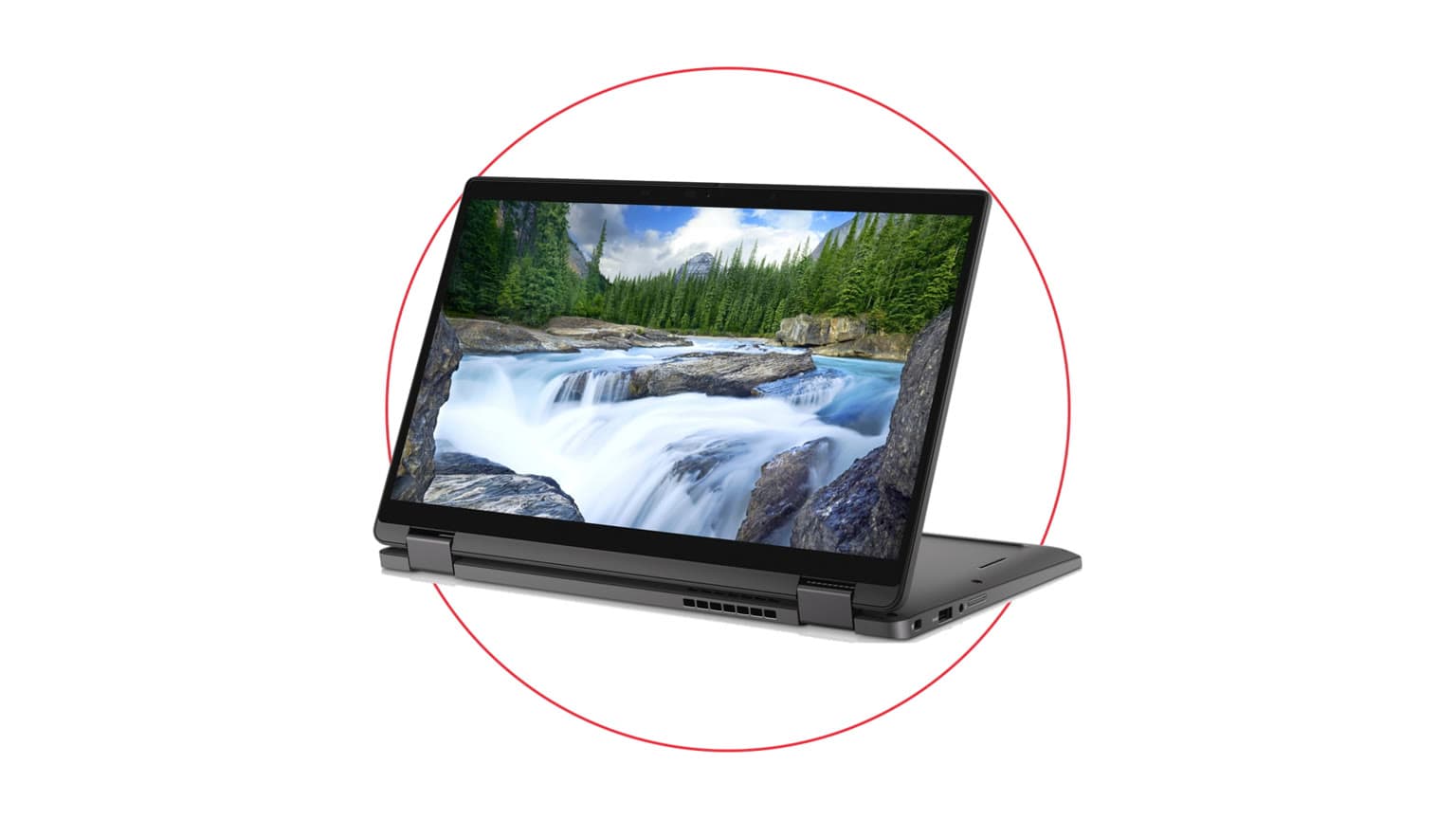
The Dell XPS 13 9365 is a compact premium Dell laptop for buyers who care more about portability, touchscreen flexibility and a nicer build class than raw performance. Its catalog facts point to a 13.3-inch FHD/QHD+ touchscreen option, Intel Core i5/i7 7th Gen processor options, Intel HD/UHD graphics class, stereo speakers, microSD card reader, headphone jack and a listed weight of 1240g. That mix is strongest for students, business owners, writers, administrators, researchers, sales staff and remote workers who move between home, office, campus and meetings.
The buyer asking “Dell XPS 13 price in Nigeria” is usually balancing three things: enough speed for daily work, a clean premium form factor and risk control on a used machine. This model can satisfy that buyer when the selected variant is healthy and properly priced. It is not the safer pick for someone who needs a large screen for accounting dashboards all day, a dedicated GPU for games, or guaranteed all-day battery life without checking the actual battery condition.
Because this is a used product, treat the catalog price as the start of the decision, not the whole decision. OgaBassey lists the current price from ₦380,000, with variants reaching up to ₦525,000 depending on configuration. The product is marked InStock under an unmanaged catalog stock policy, which means the listing should be treated as available in the catalog, but buyers should still confirm the exact selected unit, live availability, accessories and checkout terms before paying.

Catalog-verified evidence says the Dell XPS 13 9365 is a used Dell laptop with 13.3-inch FHD/QHD+ touchscreen options, Intel Core i5/i7 7th Gen options, 8GB or 16GB RAM variants and 256GB or 512GB SSD variants. Dell’s official XPS 13 9365 specifications page is the supporting manufacturer context for this model family, while the OgaBassey product page remains the source of truth for this specific Nigeria listing, price, condition and catalog availability.
| Entity | Attribute | Catalog value or buyer action |
|---|---|---|
| Dell XPS 13 9365 | Current OgaBassey price | ₦380,000 starting catalog price; variant range shown up to ₦525,000 |
| Dell XPS 13 9365 | Availability | InStock in catalog; inventory policy is unmanaged catalog stock, so confirm live unit availability before checkout |
| Dell XPS 13 9365 | Condition | Used |
| Dell XPS 13 9365 | Category | Laptops |
| Display | Size and type | 13.3 inches; FHD/QHD+ touchscreen options |
| Display | Refresh rate | 60Hz |
| Platform | Processor | Intel Core i5/i7 7th Gen options |
| Graphics | GPU class | Intel HD/UHD graphics class |
| Memory and storage | Variants | 8GB or 16GB RAM; 256GB or 512GB SSD, configuration dependent |
| Connectivity | 5G support | No |
| Camera | Optical image stabilization | No; webcam class is 720p/1080p, configuration dependent |
| Trust check | Warranty and delivery context | Not listed as a fixed promise in the catalog snapshot; confirm warranty, return window, charger and delivery terms with OgaBassey before checkout |
The most important variant decision is RAM. For 2026 Windows use, 8GB can work for browsing, documents, email, video calls and light admin tools, but it leaves less breathing room when many browser tabs, WhatsApp Desktop, Teams, Excel and antivirus are open together. A 16GB variant is the better target if the buyer wants the machine to feel useful for longer. Storage is simpler: 256GB is fine for cloud-first users, while 512GB is more comfortable for offline files, school materials, media and software installers.
The 13.3-inch touchscreen is the main reason to buy this XPS over many budget Dell laptops. It is more portable than a 15.6-inch Inspiron or Latitude, and the touchscreen/convertible nature is useful for reading, signing documents, marking PDFs and presenting across a desk. The trade-off is workspace. If you spend most of the day inside spreadsheets, design tools or split-screen dashboards, a larger laptop or an external monitor will feel better.
The Intel Core i5/i7 7th Gen options are suitable for standard productivity, online classes, office apps, email, browser-based work, media streaming and light photo edits. They are not a modern performance platform for heavy video editing, large code builds, serious design rendering or current gaming. The Intel HD/UHD graphics class is integrated graphics, so it should be treated as a display and everyday media solution, not as a gaming GPU.
For school use, the Dell XPS 13 9365 is strongest when the buyer needs a compact Windows machine for assignments, slides, research, video calls and travel. For remote work, it fits users whose work sits inside Chrome, Edge, Microsoft 365, Google Workspace, Slack, Zoom, Teams, accounting portals and lightweight CRM tools. For creators, it is best as a writing, admin, client communication or light editing machine. For gaming, it should be avoided unless your expectation is very light older titles or browser games.
Battery life is the biggest used-laptop variable. The catalog snapshot does not list a measured battery score, battery cycle count or runtime, so a buyer should not assume fresh-battery endurance. Ask for the current battery health report, check whether the laptop holds charge under video call or browser load, and confirm whether the charger is original or a safe compatible replacement. In Nigeria, where power interruptions and inverter/generator use are common, a weak battery changes the real value of the machine quickly. A neat body and good screen are not enough if the battery drops too fast for class or meetings.
Thermals also matter because thin premium laptops can feel fast when clean and slow when dusty, old or running hot. Before checkout, confirm that the fan is not noisy at idle, the keyboard area does not become uncomfortable under simple browsing, and the system does not shut down under sustained use. These are condition checks, not official lab claims. They are practical buyer checks for a used XPS.

The catalog lists a microSD card reader, headphone jack and stereo speakers, plus no 5G support, no NFC and no radio. That means the Dell XPS 13 9365 should be treated as a Wi-Fi-first Windows laptop. If you need mobile data, budget for phone hotspot use, a MiFi device or a USB tethering setup. If you need Ethernet, HDMI, multiple USB-A devices or projector compatibility for school or church presentations, ask which adapter or hub is included, because thin XPS models often push buyers toward dongles.
Port condition deserves a physical check. Test charging from the included adapter, test audio from the 3.5mm jack, test the microSD reader if you use camera cards, and test every USB-C or expansion port available on the actual unit. A used laptop can look clean but have a loose port, weak charger cable or intermittent charging behavior. Those issues are more annoying in daily use than a small scratch on the lid.
Upgradeability is another reason to verify the exact unit. The product description says variants carry exact RAM, SSD, processor and display combinations, but the catalog snapshot does not promise a simple RAM upgrade path. For most buyers, choose the RAM you can live with from day one instead of buying an 8GB unit and hoping to upgrade later. SSD capacity is easier to reason about, but even there, confirm what is installed, what health it reports and whether any upgrade would affect warranty or return terms.
The first trade-off is age versus premium feel. A used XPS 13 9365 can feel more refined than many cheaper plastic laptops, but the 7th Gen Intel platform is older. You buy it for portability, touchscreen usefulness, typing comfort and build quality, not because it will outrun newer midrange laptops.
The second trade-off is screen size. At 13.3 inches and 1240g, it is easy to carry. That is excellent for a student bag or a Lagos commute, but it is not the most comfortable screen size for long spreadsheet days. If this will be your only computer for eight-hour desk work, consider whether you will add an external monitor or whether a 14-inch or 15.6-inch Dell Latitude would suit you better.
The third trade-off is condition risk. Used and open-box buying is not just about the lowest price. The buyer should inspect the hinge, touchscreen response, keyboard backlight if present, trackpad clicks, speakers, webcam, microphone, Wi-Fi stability, charger, battery report, body dents, screw condition and screen pressure marks. Warranty and delivery context must be confirmed because the catalog snapshot does not provide a universal fixed warranty promise. OgaBassey can be the right channel, but the buyer still needs the exact unit terms in writing.
If you like the Dell brand but are unsure about this compact XPS, compare it against practical Dell options in the OgaBassey laptop catalog. A Dell Inspiron 15 3000 may suit buyers who prefer a larger screen and more basic daily use. A Dell Latitude 3410 or Dell Latitude 3420 is often the more business-practical direction if durability, serviceability and office fleet styling matter more than a premium XPS feel. A Dell Latitude 3520 is worth checking if you want a larger work screen, while the Dell Vostro 5481 can be a middle path for business users who want a compact Dell without chasing the XPS design.
| Option | Better fit | Reason to compare |
|---|---|---|
| Dell XPS 13 9365 | Portable premium touchscreen work | 13.3-inch touchscreen, light body and compact XPS design |
| Dell Inspiron 15 3000 | Budget larger-screen everyday use | Consider if screen size matters more than premium portability |
| Dell Latitude 3410 | Office and school practicality | Compare if business durability and repair practicality matter |
| Dell Latitude 3420 | Newer-feeling compact business use | Compare if you want a Dell work laptop with a more conventional business profile |
| Dell Latitude 3520 | Larger office work surface | Compare if 13.3 inches feels too small for daily spreadsheets |
| Dell Vostro 5481 | Compact business value | Compare if you want a practical Dell laptop without paying only for XPS styling |
For more XPS-specific context, OgaBassey has related buying guidance on the Dell XPS 13 9360 at ₦450,000 and the Dell XPS 13 9380 at ₦490,000. Those are useful if you want to understand how nearby XPS generations differ in price, portability and buyer fit before settling on the 9365.
Buy the Dell XPS 13 9365 at ₦380,000 if the exact unit has the RAM and SSD you need, a healthy battery, a clean touchscreen, working ports, a reliable charger and clear OgaBassey warranty or return terms. The best-fit buyer is a student, writer, remote worker or business user who values a light 13.3-inch touchscreen laptop more than gaming power or a large screen.
Skip it or compare alternatives if you need a dedicated graphics card, a bigger display, newer processor performance, confirmed long battery runtime or easier upgrade flexibility. The price is attractive only when the condition checks support it. If the unit is 8GB/256GB with weak battery health, a Latitude or Inspiron alternative may be the better Nigeria value. If it is a clean 16GB/512GB unit with a good battery and clear checkout terms, the XPS 13 9365 remains a sharp compact Windows choice.
The current OgaBassey catalog price starts at ₦380,000 for the Dell XPS 13 9365, with listed variant pricing up to ₦525,000. Confirm the exact RAM, SSD, processor, display option, condition and live checkout availability before payment.
Yes, if the unit has a healthy battery and the right RAM/storage configuration. It is best for documents, research, online classes, meetings, browsing and office work. It is not the best choice for modern gaming, heavy editing or large engineering workloads.
Choose 16GB if available and affordable. 8GB can handle basic school and office work, but 16GB gives better breathing room for many browser tabs, Microsoft 365, Teams, Zoom and daily multitasking in 2026.
Confirm battery health, charger condition, touchscreen response, hinge firmness, keyboard, webcam, speakers, Wi-Fi, ports, SSD health, warranty or return terms, and the exact selected variant. For used laptops, condition checks protect value as much as specs do.